For years, home office setups evolved mostly around ergonomic chairs, ultrawide monitors, and adjustable desks. But for many developers, one of the most meaningful changes started with a tool they use thousands of times every single day: the keyboard.
Even though programmers spend hours writing code, moving between files, and relying on constant key combinations, the traditional keyboard is rarely questioned as part of the problem. The market still treats keyboards as universal accessories, even though the workflow of someone building software is very different from that of the average user.
Mechanical split keyboards have started gaining traction precisely because they address part of that gap. More than an aesthetic trend, they represent a practical shift in how many professionals type, organize their workspace, and interact with their daily workflow.
Why Traditional Keyboards Exhaust Developers More Than Other Professionals
Typing code is very different from simply writing long blocks of text. Developers spend the day switching between quick commands, symbols, and constant key combinations involving Ctrl, Shift, and Alt. In programming languages, characters like {}, (), [], =>, and <> appear constantly, creating repetitive movements that are quite different from regular typing.
The problem is that the traditional keyboard was never really designed for this kind of intense use. Its rectangular layout forces the hands inward for hours at a time, creating a posture known as ulnar deviation — something that becomes especially noticeable during long programming sessions. For anyone constantly moving between VS Code, terminal windows, and keyboard navigation, that strain can become even more pronounced.
In practice, this creates a kind of silent fatigue. Most people do not feel immediate pain, which makes the setup seem perfectly fine at first. But by the end of the day, subtle signs begin to appear: heavier fingers, the constant need to reposition the hands, and a lingering sense of fatigue that many developers simply blame on overwork.
It is exactly this almost invisible accumulation that leads many developers to realize the issue may not be only the workload itself, but also the tool they are using for hours every day.
What Actually Changes in Daily Use When You Start Using a Split Keyboard
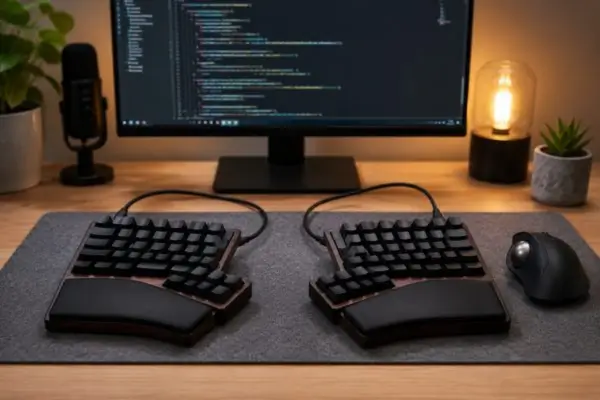
The biggest difference with a split keyboard becomes noticeable even before the first line of code is written. Since both halves can be positioned independently, users can adjust the distance and angle of their hands according to their own shoulder width — something impossible with traditional one-piece keyboards.
That flexibility changes the entire desk experience in a noticeable way. A more open hand position reduces rigid movement during long programming sessions and creates a more natural balance between both sides of the body. Instead of adapting your posture to the keyboard, the keyboard adapts to your workspace and personal typing style.
Another detail many users quickly notice is the impact of tenting — the slight lateral incline of each keyboard half. By raising the inner side of the keyboard slightly, wrist positioning becomes less restricted during long hours of debugging, code reviews, or constant file navigation.
There is also a less discussed but surprisingly practical change: the mouse moves closer to the body again. Since split keyboards take up less central desk space, excessive lateral reach is reduced. In compact setups, this creates a much more balanced feeling without requiring major changes to the desk itself.
At first, it may seem like a small adjustment, but many people notice that the overall feel of their setup improves faster than their typing speed does.
The Learning Curve — and Why Many Developers Never Go Back
Despite the advantages, switching to a split keyboard is rarely instant. During the first few days, the experience often feels strange even for experienced developers. Keys like B, Y, or certain modifiers expose old muscle-memory habits that have been repeated automatically for years on conventional keyboards.
Typing speed usually drops during the first few weeks, especially in tasks involving heavy shortcut usage or intensive terminal work. Some users say the split spacebar is one of the hardest things to get used to at first, particularly for people who move quickly between editors, browsers, and command-line tools.
What is interesting is that many professionals notice physical improvements even before their performance fully recovers. Less shoulder tension, more relaxed hands, and a reduced need to constantly reposition can start to appear during the adaptation phase itself — precisely when typing still feels slower.
But the adjustment is not only about relearning movement patterns. A large part of the migration happens because split keyboards usually offer a level of customization rarely found in traditional peripherals. Models powered by QMK or ZMK allow users to create dedicated layers for programming symbols, custom shortcuts, and advanced combinations that reduce finger travel considerably.
That completely changes the developer’s relationship with the keyboard. Features like home row mods — where central letter keys temporarily function as Ctrl, Alt, or Shift when held — reduce repetitive movement and make daily workflows more efficient. For many developers, the keyboard starts to feel less like a peripheral and more like a configurable extension of their development environment.
When a Split Keyboard Is Not Worth It — and Who Actually Benefits From One
Despite the growing popularity of split keyboards among developers, they are not automatically the best choice for every setup. In many cases, the benefits only become truly noticeable in very specific routines.
Mobility is one of the biggest limitations. Many split models are designed for permanent desk setups, not for workflows where the keyboard constantly needs to go in and out of a backpack. Professionals who frequently alternate between the office, coworking spaces, and home office setups may experience more friction with this kind of configuration.
Cost also plays a major role in the decision. More complete models frequently exceed the $150 range, and many of the most popular keyboards within the enthusiast community require assembly, manual configuration, and at least some familiarity with firmware and custom layouts.
On top of that, not every usage profile will see meaningful improvements after switching. People who spend most of their time using a laptop touchpad, handling quick tasks in different locations, or constantly alternating between devices may end up benefiting very little from the split format.
On the other hand, developers with dedicated desk setups, long programming sessions, and intensive keyboard use tend to notice the advantages much more clearly. In that context, a split keyboard makes far more sense as a long-term work tool than as a simple desk upgrade.
Mechanical Split Keyboard Models Worth Knowing Before Buying
For anyone who wants to try the format without immediately diving into the DIY world, models like the Keychron Q11 and the Mistel Barocco MD770 are usually among the most accessible options. They maintain a typing experience relatively close to traditional keyboards, which can make the initial adaptation period much easier.
Meanwhile, models like the Sofle, Corne, and Lily58 tend to attract users who are more interested in customization and workflow optimization. The Corne, for example, became especially popular among developers who adopt minimalist layouts and home row mods, while the Lily58 often appeals to users who still prefer dedicated number keys without giving up the split format.
Among premium options, the Dygma Defy has gained attention for offering a more ready-to-use experience, including integrated tenting and simplified configuration, without requiring as much familiarity with assembly or firmware customization.
Many of these keyboards exist within DIY culture, where users choose switches, keycaps, firmware, and even the final layout of the device themselves. For many professionals, that is part of the appeal. The keyboard stops being just another off-the-shelf accessory and starts functioning as a tool tailored to their own way of working.
Communities like the subreddit r/ErgoMechKeyboards have also become one of the main references for comparing layouts, understanding adaptation curves, and discovering which models actually perform well in real-world daily use.
Mechanical split keyboards are gaining space among developers because they solve problems traditional keyboards were never designed to address. More than just comfort, they offer positioning freedom, deep customization, and a typing experience that feels far more aligned with the reality of spending hours programming every day.
That does not mean the format makes sense for everyone. In mobile setups or more casual use cases, the adaptation period and higher cost may not justify the switch. But for developers who work with code daily and care about refining their workspace, split keyboards have moved far beyond being a niche curiosity.
Ultimately, a keyboard is still just a tool — but for people who spend the entire day programming, the wrong tool can affect productivity and comfort far more than it might seem at first.