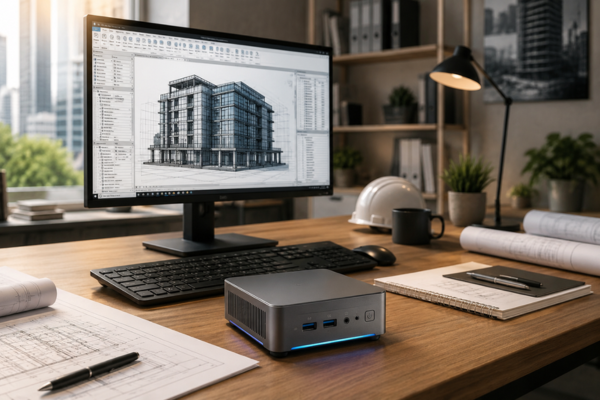
Over the last few years, a quiet shift has started to appear on architecture office desks. Computers about the size of a thick book have begun replacing primary workstations rather than serving as secondary machines.
Models such as the Beelink SER7 and ASUS NUC 14 Pro have become deliberate choices for professionals who use Revit, SketchUp, and BIM coordination every day, and the market increasingly refers to them as mini workstations for exactly that reason.
This is not happening because firms cannot afford larger systems. It is happening because many architects have realized something that completely changes how hardware should be evaluated: the real bottleneck is rarely where most people assume it is.
Revit Needs Less Than Most People Think
For years, the standard BIM recommendation was simple: more CPU cores equals better performance. The logic sounds convincing. More cores mean more parallel processing, and complex projects appear to demand as much processing power as possible.
In practice, Revit behaves very differently from what many people expect. Opening a model, syncing with the BIM server, generating schedules, and regenerating views depend largely on single-core performance and on how quickly the system can read and write data to storage.
A mid-sized residential project with two or three floors and linked structural and MEP files is far more likely to feel slow because of a sluggish drive than because it lacks extra CPU cores.
That completely changes how hardware should be evaluated. A compact machine with a high-clock-speed processor and a modern NVMe SSD capable of reading data at more than 5,000 MB/s can complete these operations faster than older workstations equipped with 16-core Xeon processors running on conventional storage. For most projects, the bottleneck is storage performance, not raw core count.
Architects who recognized this stopped comparing processors by the number of cores alone and started paying attention to specifications that manufacturers rarely emphasize in marketing campaigns.
What Stays Local and What Moves to the Cloud
A compact workstation does not succeed in isolation. It succeeds because the workflow has been reorganized around it.
Heavy rendering, the kind of processing that can occupy a machine for hours, has increasingly moved to cloud services such as Chaos Cloud and Render Network, where GPU usage is billed by the hour. The local machine is then free to handle the tasks that require immediate responsiveness: modeling, multidisciplinary coordination, project reviews, and technical documentation.
What many professionals still overlook is that tools like Enscape and Lumion already offload part of the workload to remote infrastructure, significantly reducing the need for a powerful local graphics card during real-time visualization.
In practice, this means that current-generation integrated graphics, including Intel Arc and AMD Radeon 890M, are often sufficient for navigating models and reviewing designs during development. A dedicated GPU only becomes essential when producing presentation videos locally or processing dense point clouds in Autodesk ReCap for existing-building surveys.
This division between local processing and cloud processing is what makes compact systems viable for real professional projects. Firms that fail to map their workflow before purchasing hardware usually end up at one of two extremes: they either overspend on power they never use, or they buy too little and blame the computer for a workflow problem.
Mini Workstations and The Cost Calculation That Changes the Decision
The most common comparison between a traditional workstation and a compact system stops at the purchase price. That comparison misses what happens over the following months.
A conventional workstation consuming 400–600 W and running eight hours a day on business days creates a meaningful ongoing electricity cost, especially when the machine remains powered on after rendering has finished. A mini workstation consuming roughly 15–45 W represents only a fraction of that expense over the same period, and the difference compounds throughout the year.
Cloud rendering adds another layer to the calculation. GPU time is billed only when a project actually needs it, often around US$0.10–0.50 per GPU hour depending on the service, rather than all day, every day.
For independent architects and small studios managing two or three projects simultaneously, paying for rendering capacity on demand is frequently less expensive than keeping a workstation sized for peak demand running continuously. Viewed this way, a compact workstation is not a budget compromise. It is a more efficient operational decision.
Where Compact Systems Still Reach Their Limits
Large collaborative BIM projects with multiple linked disciplines, models exceeding 500 MB, and several team members working simultaneously can require more memory than most compact systems currently support. Many mini workstations top out at 64 GB of RAM, which is more than adequate for mid-sized projects but can become restrictive on complex commercial developments with highly detailed consultant models.
Dense point-cloud processing and exporting high-resolution presentation videos locally are also tasks where compact systems begin to show their limits without a dedicated GPU.
Rather than replacing the entire setup, many firms handle these exceptions by maintaining remote access to a more powerful workstation through tools such as Parsec or Moonlight. The compact machine handles the vast majority of daily work, while specialized tasks are delegated to the remote system only when needed.
For a long time, hardware selection followed a simple rule: buy the most powerful machine the budget allows and hope it will handle any future demand. What architecture firms that have moved to compact workstations have demonstrated in practice is that this approach skips the most important step: identifying where the workflow actually consumes resources before choosing the hardware.
Architects who mapped their real bottlenecks ended up with smaller machines, lower operating costs, and performance that remains fully adequate for day-to-day work. The shift was not driven by budget limitations. It was driven by a more accurate diagnosis. In the end, knowing where the true bottleneck is makes the difference between a well-informed purchase and an expensive assumption.