Teaching online has changed quietly but dramatically, moving far beyond simply turning on a webcam and sharing a few slides. What once passed as a temporary digital workaround now requires a level of professionalism much closer to modern content production.
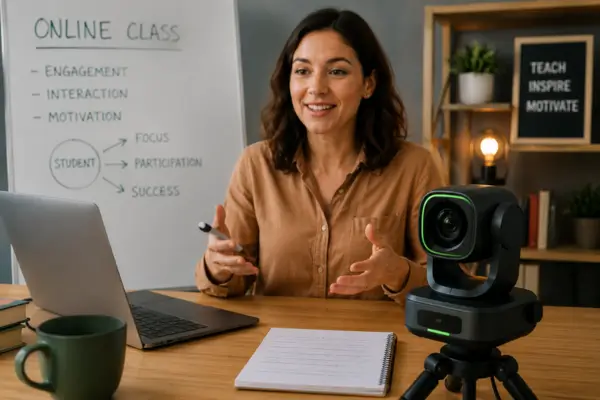
One of the biggest challenges for educators working from home is breaking through the screen and delivering the kind of energy students would normally feel in a physical classroom — something a static, limited frame rarely manages to do. That is where AI-powered facial-tracking cameras become valuable allies, giving teachers the freedom to use movement, body language, and physical space as part of the learning experience.
This technology allows the camera to follow movement automatically, keeping the instructor centered without the need for a camera operator. Once this feature becomes part of the setup, the workspace feels less restrictive and starts functioning more like a dynamic teaching environment where explanations flow naturally.
That shift directly affects how students absorb information, turning a passive lecture into a more engaging visual experience. Understanding this dynamic is the first step toward holding the attention of an audience that is always one click away from distraction.
The Science Behind Movement and Attention Retention
Staring at a motionless image for long periods can create visual fatigue, making it harder to stay focused and retain information. The human brain is naturally drawn to movement, and experienced educators are increasingly using that instinct to their advantage in digital learning environments.
When a teacher moves to pick up an object or emphasizes a point with stronger gestures, those motions create visual anchors that refresh the viewer’s attention in real time. Facial tracking supports this process by maintaining a clean frame while the instructor moves freely around a home studio setup.
That sense of visual fluidity helps simulate physical presence, reducing the emotional distance that remote learning often creates. Instead of appearing as just another talking head inside a small box, the teacher becomes a presenter fully in control of the space. Movement also adds rhythm and emphasis to speech, preventing lessons from sounding flat or monotonous.
This level of physical expression is often what separates a forgettable tutorial from a class that genuinely connects with students. Still, having the camera follow your movements is only part of the equation, because the real advantage comes from controlling the entire experience without interrupting the lesson itself.
How Facial-Tracking Cameras Improve Attention Retention
One of the biggest frustrations of recording lessons alone is constantly stopping to adjust zoom levels or check whether the framing still looks right. Modern cameras solve much of that problem with gesture recognition, allowing teachers to control key functions using simple hand movements.
A “V” sign can activate tracking, while an open palm may trigger a smooth zoom toward an object being demonstrated. This kind of interaction removes the need to rely on keyboards or mice, helping the lesson maintain a polished and uninterrupted flow.
That level of autonomy makes the recording process feel far more natural and less technical. Instead of worrying about equipment, educators can stay focused on what actually matters: teaching clearly and maintaining a strong connection with students. The AI behind these cameras is designed to ignore sudden background distractions and prioritize the instructor’s face or body, which helps keep the image stable even in imperfect lighting or improvised workspaces.
Ease of use like this opens the door to teaching formats that would otherwise require extra staff or complex production setups, especially when demonstrations go beyond simple face-to-camera explanations.
Multimodal Flexibility: From Face to Whiteboard
Many subjects require teachers to step away from the camera to write on a whiteboard or demonstrate something on a desk. Traditionally, that meant investing in multiple cameras and expensive switching equipment — a setup that simply is not realistic for most home offices.
Newer facial-tracking cameras now include dedicated whiteboard modes capable of detecting writing surfaces automatically. These systems can correct image perspective and improve contrast so notes remain easy to read, even when the camera is positioned at an angle.
Another feature changing the way online classes are produced is automatic desk-view mode, where the lens tilts down toward the workspace without manual adjustment. This is especially useful for subjects like art, math, crafts, or any field that depends heavily on hands-on demonstrations.
The transition between the teacher’s face and the desktop view happens smoothly, preserving continuity and avoiding distracting cuts during the lesson. That versatility allows a single device to replace an entire collection of equipment, making life significantly easier for educators working in limited spaces.
Better Organization and Impact in Small Spaces
Building a productive home office often comes down to making smart decisions about space. Most facial-tracking cameras are compact devices that eliminate the need for bulky tripods or complicated mounting arms. Many can be attached directly to a monitor or placed on small magnetic mounts, helping keep the environment clean and visually organized.
For teachers turning part of a bedroom or living room into a professional recording space, that functional minimalism becomes a major advantage.
Mechanical gimbals also give these cameras a much wider range of motion compared to traditional webcams. Even in narrow rooms, the camera can follow movement naturally without forcing the instructor to constantly reposition themselves. For apartment setups where every inch matters, that flexibility makes a noticeable difference in both comfort and production quality.
Having equipment that works with you instead of against you reduces pre-recording stress and makes the teaching routine feel lighter and more sustainable. Once the environment is organized and the technology becomes intuitive, the next step is understanding which type of investment actually matches your teaching style.
Choosing the Right Long-Term Investment
Selecting the right camera starts with being honest about the demands of each teaching format. Language instructors, for example, often benefit from ultra-fast autofocus systems capable of capturing subtle mouth movements with precision. Teachers working in more active environments, such as dance or physical education, may need stronger motors capable of handling faster movement across the room.
The market now includes everything from compact webcams with digital tracking to advanced three-axis gimbal systems that deliver almost cinematic smoothness.
Investing in an intelligent camera should be seen as a long-term strategy for building authority and professionalism online. High-quality video combined with fluid movement immediately communicates credibility and respect for the student’s time. Rather than spending money on multiple accessories with limited impact, focusing on a central device that improves both video quality and automation is often the fastest path toward a more polished result.
Technology works best when it becomes an invisible bridge that delivers knowledge in the clearest and most engaging way possible.
Ultimately, the future of online education belongs to teachers who understand that the screen is not a limitation, but an opportunity. By integrating facial-tracking cameras into their workflow, educators regain control over both their environment and the way their lessons are presented, creating classes that feel dynamic, immersive, and difficult to ignore.
The home office stops being a place of improvisation and evolves into a true professional teaching studio where comfort, innovation, and communication work together naturally. In many ways, upgrading your setup is also about upgrading the way you share your passion for teaching with the world.