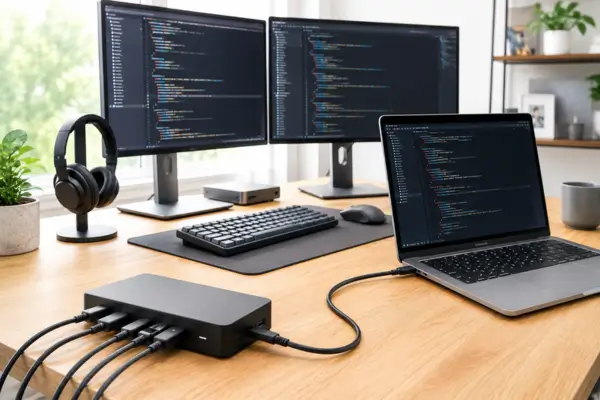
Modern programming workstations have become incredibly powerful — and increasingly complex. Today, many developers rely on dual monitors, external SSDs, mechanical keyboards, audio interfaces, high-end webcams, and a growing collection of adapters spread across their desks.
While all these devices improve productivity, they also create a frustrating problem: too many cables and too many connections to manage. Many programmers move between home offices, coworking spaces, and traditional office environments, which means constantly plugging and unplugging peripherals. At the same time, modern laptops continue to offer fewer built-in ports.
That combination has quietly turned connectivity into one of the most overlooked productivity bottlenecks. Small interruptions caused by unstable hubs, unreliable adapters, or limited ports slowly add friction throughout the day.
This is exactly why Thunderbolt 4 docks have started gaining so much attention. More than simple hubs, they function as the central foundation of a workstation, allowing developers to connect high-performance peripherals, charge their laptops, and organize their entire setup through a single cable.
Thunderbolt 4: The Backbone of a High-Performance Workstation
One of the biggest advantages of Thunderbolt 4 is bandwidth. The standard supports up to 40Gbps of bidirectional data transfer — a specification that may sound overly technical at first, but delivers very practical benefits in real-world workflows.
For developers, that means running multiple high-resolution monitors without lag, transferring massive projects in seconds, and connecting several demanding peripherals simultaneously without overwhelming the system. Unlike older USB standards that begin to struggle under heavy workloads, Thunderbolt 4 was specifically designed for high-performance environments.
The difference becomes especially noticeable when multiple devices are active at the same time. A developer might be running Docker containers, syncing large repositories, transferring files to external SSDs, participating in video calls, and using several displays simultaneously. Generic USB-C hubs often become unstable in these situations, leading to dropped connections, inconsistent speeds, or display issues.
Thunderbolt 4 docks handle resource distribution far more efficiently. Instead of creating bottlenecks between devices competing for bandwidth, the connection remains stable even during intense multitasking sessions.
Another major advantage is robust Power Delivery support. Many Thunderbolt 4 docks provide 90W or more of charging through the same cable used for data and video. In practice, this completely removes the need for a separate laptop charger.
For developers who frequently move between different work environments, that level of simplicity can completely change the daily routine. Sitting down and connecting a single cable instantly activates the full workstation: monitors, external storage, networking, audio, and charging all become available immediately.
Integrating Demanding Peripherals Without Sacrificing Performance
Modern workflows rely heavily on external peripherals, especially for developers working with large codebases, virtual machines, cloud environments, or multimedia tools.
One of Thunderbolt 4’s biggest strengths is support for multiple displays. Most certified docks can comfortably handle dual 4K monitors at 60Hz or even a single 8K display. For programmers, screen space is not simply about aesthetics — it directly affects productivity.
Keeping documentation open on one screen, code editors on another, and terminals or debugging tools on a third significantly reduces constant context switching during long development sessions.
External storage performance is another area where Thunderbolt 4 stands out. External NVMe SSDs connected through Thunderbolt can reach speeds remarkably close to a computer’s internal storage, making them highly practical for virtual machines, large development environments, or extensive media libraries.
That difference becomes particularly noticeable when working with heavy Docker images, local databases, Unreal Engine projects, AI models, or large video files. Instead of treating external drives as slow secondary storage, many developers can work directly from them without noticing meaningful performance limitations.
Thunderbolt 4 docks also make it easier to integrate professional audio equipment and high-speed networking. Many premium models include 2.5GbE or even 10GbE Ethernet ports, which can be especially useful for developers working with remote servers, NAS systems, or large network transfers.
Audio integration becomes more reliable as well. Developers involved in streaming, technical content creation, podcasts, or remote meetings often rely on dedicated microphones and audio interfaces. Thunderbolt’s low latency helps maintain stable performance without the random interruptions commonly associated with cheaper USB hubs.
How a Single Cable Simplifies an Entire Workstation
The biggest appeal of a Thunderbolt 4 dock is not necessarily raw speed. For many programmers, the real transformation comes from workflow simplicity.
Instead of connecting monitors, chargers, Ethernet adapters, SSDs, webcams, and audio devices individually, the entire workstation operates through a single connection.
That may sound like a minor convenience — until it becomes part of the daily routine.
For developers who regularly switch between office and home office environments, the difference becomes obvious almost immediately. Sitting down and plugging in one cable is dramatically simpler than rebuilding an entire setup every day.
The impact goes beyond organization. Removing those repetitive steps eliminates dozens of small interruptions throughout the day. Everything becomes ready almost instantly, allowing developers to stay focused on actual work instead of dealing with hardware setup.
There is also an underrated ergonomic benefit. Cleaner cable management frees up valuable desk space and reduces the visual clutter that naturally builds up in larger workstations.
Thunderbolt 4 docks also provide a level of flexibility that traditional setups often struggle to match. Adding a new monitor, external SSD, capture card, or accessory usually requires very little adjustment because the dock acts as the central infrastructure of the entire workspace.
As workflows evolve over time, the setup can evolve alongside them without forcing developers to completely reorganize their desks.
What Actually Matters When Choosing a Thunderbolt 4 Dock
Not all Thunderbolt docks deliver the same experience, especially in programming-focused setups.
The first thing to evaluate is connectivity. A good dock should offer a balanced combination of USB-A, USB-C, HDMI or DisplayPort, Ethernet, audio ports, and ideally an SD card reader.
The ideal configuration depends heavily on the workflow itself. Some developers prioritize multiple display outputs, while others care more about fast external storage or advanced networking capabilities.
Another critical factor is certification.
Certified Thunderbolt 4 docks follow strict compatibility and performance standards across Windows, macOS, and increasingly Linux environments. Many generic USB-C hubs may look similar externally, but become unstable under heavy workloads or offer limited monitor support.
Reliability ultimately matters far more than saving a small amount of money on a lower-quality alternative. Developers depend on stable peripherals every day, especially during long programming sessions and remote work.
Although Thunderbolt 4 docks are more expensive than standard USB hubs, many professionals eventually start viewing them as long-term infrastructure rather than temporary accessories.
A high-quality dock can remain useful through multiple laptop upgrades, monitor changes, and workflow evolutions over the years.
Ultimately, Thunderbolt 4 docks are gaining popularity because they solve a modern problem that traditional connectivity standards never fully addressed. They simplify complex workstations, reduce daily friction, and create a cleaner, more stable, and more efficient workspace.
For developers who spend hours moving between code editors, terminals, meetings, and creative tools, that level of practicality can have a much bigger impact than it initially appears. The real advantage of Thunderbolt 4 is not just speed — it is the ability to make a complex workstation feel simple again.