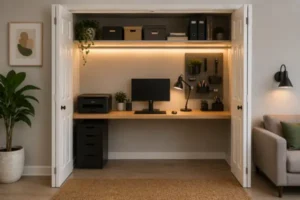
In the world of remote work, the efficiency of a compact workspace depends heavily on how intelligently every element is integrated into the environment. Limited space forces each component of a setup to do more than just fulfill its primary function — it also needs to actively contribute to organization and spatial efficiency.
Traditional desk lamps, even highly adjustable ones, often fall short in this regard, taking up valuable desktop real estate that could be used more effectively elsewhere.
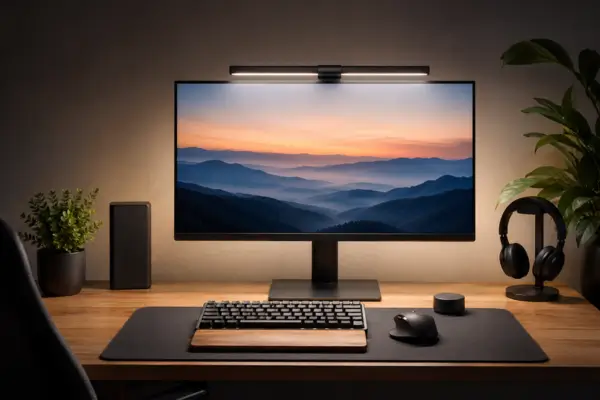
This is exactly where monitor light bars stand out as a more refined engineering solution, redefining the concept of task lighting for modern workspaces. Instead of occupying desk space, they sit directly above the monitor, delivering focused illumination while maintaining a cleaner and more functional setup.
This article explores the technical and practical aspects that make these lighting systems especially valuable for smaller desks, from color accuracy and light distribution to ergonomic integration within a productivity-focused workspace.
Once properly implemented, lighting becomes more than a visual enhancement — it becomes part of the structure that makes a compact setup feel efficient, balanced, and professionally optimized.
The Science Behind CRI (Color Rendering Index) and Visual Clarity
For professionals who rely on visual accuracy — including graphic designers, video editors, photographers, and anyone working with digital color — lighting quality matters just as much as monitor resolution. This is where CRI, or Color Rendering Index, becomes a critical technical specification.
CRI measures how accurately a light source reproduces colors compared to natural daylight. A CRI rating of 90 or above is generally considered excellent, especially for environments where color precision is essential.
In compact home office setups, natural light is often inconsistent or limited throughout the day. A monitor light bar with a high CRI helps maintain accurate color perception across both digital screens and physical materials, reducing inconsistencies that can lead to mistakes or unnecessary revisions.
Beyond creative work, high-quality lighting also contributes to a more visually balanced environment, minimizing eye fatigue caused by poor contrast or distorted tones.
Lighting precision like this can make a noticeable difference in how comfortable and functional a workspace feels during long hours of work. Understanding how light intensity is measured helps clarify why proper adjustment matters so much in smaller environments.
Lux vs. Lumens: Measuring Light for a More Functional Workspace
Understanding the difference between Lux and Lumens is essential when optimizing lighting for a home office, especially in compact spaces.
Lumens measure the total amount of light emitted by a source — essentially the raw brightness output. Lux, on the other hand, measures illuminance, meaning how much light actually reaches a specific surface within a defined area.
For productivity and visual comfort, Lux is the more relevant metric. Different activities require different illumination levels. Reading and writing tasks typically benefit from around 300 to 500 Lux, while detail-oriented work may require levels closer to 750 or even 1000 Lux.
A high-quality monitor light bar allows these levels to be adjusted with precision, providing enough brightness without introducing glare, harsh reflections, or uncomfortable shadows. In small workspaces, this becomes especially important because poorly distributed lighting can quickly create visual strain and make the setup feel cluttered or unbalanced.
Proper Lux control also changes the way the workspace feels visually, making the desk appear cleaner, more balanced, and less tiring to work in over extended periods.
Counterweight Design and Universal Monitor Compatibility
One of the most interesting engineering aspects behind monitor light bars is the mounting system itself. Unlike traditional desk lamps, these devices rely on a counterweight mechanism that rests against the back of the monitor, using gravity to keep the bar securely positioned along the top edge of the screen.
This approach eliminates the need for bulky bases or additional desk structures, immediately freeing up usable workspace.
Compatibility is another important factor. More advanced models are designed to adapt to different monitor formats, including curved displays, ultrawide monitors, and thin-bezel screens. The effectiveness of this fit largely depends on the adjustability of the counterweight system and the design of the front clamp, which must remain discreet enough not to interfere with the viewing experience.
Before purchasing, checking monitor thickness and curvature specifications is essential to ensure proper compatibility. When installed correctly, the light bar almost disappears visually, functioning as a seamless extension of the monitor itself while keeping the desktop significantly less crowded.
Integration with the Productivity Ecosystem Through Wireless Control
In minimalist setups, every element should contribute functionality without increasing visual clutter. Modern monitor light bars expand on this philosophy by integrating wireless controls into the productivity ecosystem.
Instead of placing physical buttons directly on the light bar — forcing users to constantly reach above the monitor — many premium models use a compact wireless control puck to adjust brightness and color temperature. This controller can be positioned anywhere on the desk without introducing additional cables or unnecessary accessories.
In smaller workspaces, minimizing visible hardware plays a surprisingly important role in creating a cleaner and more comfortable environment. Some systems also integrate with apps or voice assistants, making lighting adjustments easier during video calls, editing sessions, or extended nighttime work.
This more discreet approach to lighting helps create a setup that feels intentional and efficient, where technology improves productivity without adding visual clutter.
Monitor Light Bars and Solid-State LED Technology
Choosing a monitor light bar affects more than just illumination — it also impacts the long-term durability of the entire setup. The solid-state LED technology used in these systems is considerably more energy-efficient and produces far less heat than traditional incandescent or fluorescent lighting.
This lower thermal output is especially important for monitor preservation. Excess heat can accelerate wear on electronic components and potentially reduce the lifespan of LCD or OLED panels over time. Since the light bar sits directly above the display, using a low-heat lighting source helps minimize unnecessary stress on the monitor itself.
Another major advantage is LED longevity. Most high-quality LEDs are rated for approximately 25,000 to 50,000 hours of operation, significantly reducing the need for replacements and contributing to a more stable long-term workspace solution.
Ultimately, the combination of thermal efficiency, durability, and low energy consumption makes monitor light bars a practical long-term addition to compact workspaces.
In the end, organizing a small home office involves far more than simply removing objects from the desk. The equipment chosen for the setup directly influences comfort, usability, visual clarity, and the way the space functions throughout the day.
Monitor light bars stand out because they combine precise lighting, intelligent space optimization, and discreet integration within the workspace itself. Features such as high CRI ratings, Lux adjustment, counterweight mounting systems, and wireless controls demonstrate how a seemingly simple accessory can dramatically improve the overall work experience.
By freeing up desk space, reducing visual distractions, and delivering more efficient lighting, these systems help transform compact setups into cleaner, more functional environments designed for the realities of modern remote work.