Anyone who works with data analysis, financial markets, or any role that demands tracking a lot of information at once knows this feeling well: the screen never feels big enough. You’re constantly switching windows, minimizing one tab to open another, losing track of the chart you needed because it disappeared behind a spreadsheet.
For years, the standard fix was simple: add another monitor to the desk. Two side by side became the default setup for anyone handling large volumes of information. But then a new problem shows up — the desk starts running out of room, the neck starts complaining from all the side-to-side turning, and the space just disappears.
That’s the backdrop against which stacked monitors started gaining ground. Not as a replacement for everything that came before, but as a different answer to a problem that horizontal setups never really solved.
What a Stacked Monitor Setup Actually Is — and What Makes It Different
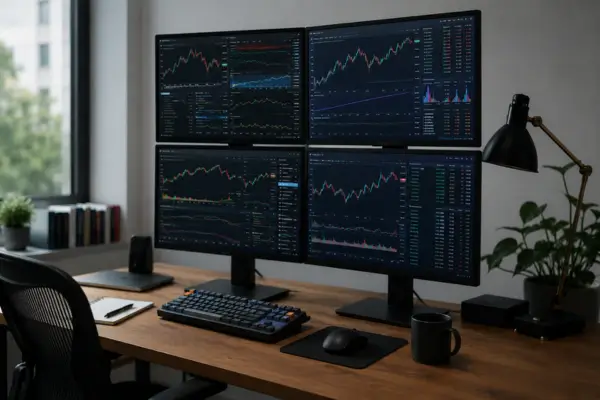
A stacked monitor setup is exactly what it sounds like: a display positioned directly above another, forming a vertical tower instead of a horizontal row. It sounds simple, and in some ways it is — but the details of how it actually works are what make the difference.
The first thing that sets these displays apart is the physical design. Monitors built for stacking have unusually thin bezels, especially along the top and bottom edges, so the seam between the two stays as discreet as possible. Positioned right, the two screens start looking less like two separate units stacked in a hurry and more like a single large panel split down the middle.
The second difference is in the mounting. Monitors meant for stacking come with bases or mounting systems designed to distribute weight evenly and keep everything stable. You can’t just plant one monitor on top of another using their stock stands — it’ll wobble, the height will be off, and eventually something gives. Setups built for this use already come with integrated mounting solutions or guaranteed compatibility with specific monitor arms.
The third point — and arguably the most important one for understanding why this trend took off specifically among traders and analysts — comes down to the logic of what you put on each screen.
Why Going Vertical Changes the Way You Work
Two monitors side by side work well when the information you’re comparing is related horizontally — documents open in parallel, tabs you switch between constantly, things that sit on the same hierarchical level.
But a trader’s or analyst’s work rarely fits that mold. There’s a natural hierarchy to the information involved: there’s what you watch constantly — prices, movements, alerts — and there’s what you check when it’s time to make a decision — historical charts, reports, analysis spreadsheets. These are different types of information, moving at different rhythms.
A vertical layout respects that hierarchy in a much more natural way. The bottom screen, sitting right at eye level, holds what you’re actively tracking. The top screen, just above your line of sight, holds what you check in — general dashboards, news feeds, messaging. There’s no more turning your head side to side. The movement is vertical, much smaller, and after a few days of adjusting, it happens almost without thinking.
Traders running several positions at once report that splitting things this way — what’s being watched versus what’s being checked — has cut down how often they need to reshuffle windows throughout the day. The information is already sitting where it should be, always visible, with no extra step required to bring it up.
Who’s Adopting This Setup, and Why Now
Stacked monitors aren’t a brand-new idea — versions of this concept have been around for a few years. What’s changed recently is the supply side: more manufacturers releasing displays purpose-built for this exact use, at more accessible prices, with image quality that used to be reserved for far more expensive gear.
Day traders were among the first to adopt this at scale, because the problem of tracking multiple positions simultaneously hits hardest in that world — seconds matter, and hunting for information on the wrong screen has a real cost. But the range of people doing this has been widening.
Data analysts working with real-time monitoring dashboards found in the vertical layout a way to keep metrics visible at all times without giving up their main workspace. Corporate finance professionals who track markets while drafting reports fell into the same camp. And more and more people who simply want two monitors but don’t have a desk big enough to fit them side by side have discovered that stacking is a solution that fits where a horizontal arrangement just doesn’t.
What to Check Before You Build This Setup
If the idea makes sense for your situation, there are a few things worth checking before you buy anything.
The first is compatibility between the two monitors. Ideally, both should match in size and bezel thickness — especially along the bottom edge of the top monitor and the top edge of the bottom one, since that’s where the seam is most visible. Stacking monitors of different sizes creates a visual mismatch that’s distracting and can make mounting harder than it needs to be.
The second is the mounting system. A dual-monitor arm built for two displays is the most stable and flexible option — it lets you adjust height and tilt for both screens together or independently. There are also cheaper desktop stacking stands made specifically for this, though they offer less room to adjust.
The third is the resolution and image quality of the top monitor. Since it sits a little further from your eyes, some professionals go with a slightly lower resolution for the top screen — since it’s displaying information you check in on, not information you analyze in detail. That can bring the total cost down without giving up anything that matters.
A Layout Shift That Changes Your Whole Pace of Work
What makes stacked monitors interesting isn’t the technology itself — it’s what the different layout does to your workflow. Information stops competing for horizontal space and starts occupying different levels of attention, in a way that feels visual and intuitive.
For anyone working with real-time data, that’s not a cosmetic detail. It’s the difference between a setup that takes effort to work with and one that works alongside you.
The question worth asking before making any change is always the same one: is the problem I’m trying to solve about desk space, about how much information I need visible at once, or about how that information is organized? If the answer touches on either of the last two, stacked monitors probably have something to offer.